
Category Archives: Tools Set

Domain Name and Hosting Plan Selection

Namecheap

Introduction

hosting-imagesIf you are going to build a web site, you firstly need to apply a domain name and hosting plan which allow people to browse your web site in internet through your domain name. It is important to get a meaning domain name which can reflect the purpose of your web site or represent your band name, then, it is easier for people to remember your web site.

Namecheap.com VS Hostgator.com

I used to maintain my domain in hostgator.com before, and I was happy with it. However, recently, the service quality of hostgator.com was spiralling downwards. Especially, in year 2014, it has a bad record which year 2014 was a tumultuous year for HostGator users. The network experience some more very serious DDOS attacks by various groups costing their clients MILLIONS of dollars in business. Some of these outages were hours, some were even over a day in length. When many of their dedicated hosting clients (paying upwards of $400 per month to host their WordPress websites) said they had enough and were jumping ship, Hostgator had nothing to offer in response other than “attacks happen”.

Here is just one of their Facebook announcements about their service levels not being up to par (and this one post had over 150 comments of people livid about the service they were receiving from Hostgator).
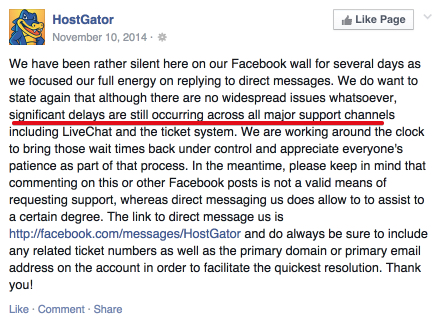
Hostgator Significant Delays

People were jumping ship left and right, I was one of them (with the few remaining sites I had on their service)…and they continue to jump ship.   And those that didn’t, were really struggling and totally shocked with the level of support they were receiving.  Here is just one of the examples:
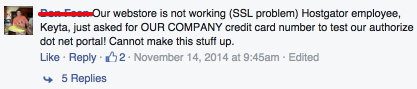
Hostgator Losing People Money

Someone with a webstore that was completely down and Hostgator was totally unable to offer them any level of educated or helpful assistance.

The first issue here is their service going down.  The second issue, is once the service isn’t working and I am losing money as a customer is NOT being able to get a proper level of help to put my mind at ease.  #fail.

Introduction of Namecheap.com

Recently, I found another domain and hosting provider called namecheap.com, which provides much better service quality and feature than hostgator.com and also the cost of namecheap.com is cheaper than hostgator.com. You can see from the banner ad below that its domain cost is just $3.98 per year, and its VPN hosting cost is just $16.95/mon.

The comparison of basic hosting plan for a single domain is as below, which namecheap.com is still the lowest cost provider.

  • NameCheap $3.48 per month
  • HostGator $3.96 per month
  • BlueHost $4.95 per month
  • GoDaddy $7.99/month

My Happy Experience on Namecheap.com Service Support

I registered a wrong domain name in Namecheap.com before. According to the Clause 10 of the Registration Agreement in Namecheap, all domain name registrations are final and non-refundable. However, the Namecheap support guy still provided me an exception to cancel my registration of wrong domain and issued me a refund, which they could ignore my request but they did not. Hence, I was highly appreciate their service.

Recommendation of Namecheap.com Service

I highly recommend Namecheap.com Service. If you want to try namecheap.com service, you can click its link <<HERE>>.

Namecheap

Image and Video Editing

Introduction

images-editingIf you want to create an attractive posts, the most important requirement is the good content which has to be valuable to your reader. In additional, people are more easy to be attracted by visual rather than text, so that you have better put some eye-catching image photo or video into your posts in order to improve its attraction. Next, I would introduce some technique to create image and video in this article.

1. Images Editing

1.1 Search for Images Photo from Web

If you want to find some suitable images, you can use Google, Bing or Yahoo search using a suitable keywords or appropriate terms to find images photo. However, to remind you about legal requirement that you should only use images which are available under the Creative Commons license, or which you have purchased. Besides Google/Bing/Yahoo, some other popular websites which you can find images are:

1.2 Editing an Image Photo or Ad Image

There are a lot of document processing tools which can be used to edit photo or create image, such as Window’s mspaint.exe, OpenOffice, Word, Google Docs. To create the image for the advertisement, I suggest the following method.

  • 1.2.1) open up a new document in your favourite word processing program (ie OpenOffice, Word, Google Docs)
  • 1.2.2) Paste your image into the document
  • 1.2.3) Add some text below the image, I suggest using the headline from your opt-in page.

Now the basic ad copy is created, we need to make it an image. The fastest way to create the image is to use a free tool called Jing, available from Techsmith:    http://www.techsmith.com/jing.html

With Jing installed you can select and drag the area of your document containing the text and save the image. The border can then be added within Jing.

Here is an example a Product image which you can put it in your WordPress’s page and post, or upload to your social networking media such as Facebook, Instagram, etc for publishing.

1


(click <<HERE>> to learn how to earn money online)

2. Screen Capture Tools for Creating Image and Video

In the software market, there are two most popular tools for user to capture screen display for creating Image and Video, called camtasia and Jing.

2.1 camtasia

Camtasia is a pay software costs around $299, but it has a trial version for user to test for a period of time. It has both window and Mac versions. Its feature has all the editing tools to create the great video content you need to get the job done. Quickly record your webcam or screen, engage your viewers with a variety of effects, and easily share your videos to anyone, anywhere. It official site for software download is :  http://www.techsmith.com/download/camtasia/

2.2 Jing

You can download Jing for FREE from the link http://www.techsmith.com/download/jing/. Jing allows you to instantly capture images and videos—then share them with anyone. Jing is a great tool for adding basic visual elements to all of your online conversations. It includes both window and Mac versions, and it is easy to install. Moreover, it also publishes a full set of training video as link -> http://www.techsmith.com/tutorial-jing.html , so that you should be able to learn and use it.

Most Popular WordPress Plugin

Introduction

wordpressI usually used WordPress as my web site builder tools. It is the most popular tools for online marketer because it is the most easy to use tools for non-technical person, no programming knowledge require, however, if you know programming, you can create much better feature or effect yourself. I highly recommend to use WordPress. I normally install the following plugin which I think they are the most useful plugin you should consider to install.

List of WordPress Plugin

1. Site Security and Configuration
Limit Login Attempts
Limit rate of login attempts, including by way of cookies, for each IP.
WP SlimStat
The most accurate real-time statistics plugin for WordPress.
WP SlimStat Dashboard Widgets
Monitor your visitors from your WordPress dashboard. Requires WP SlimStat 3.5.2+
WordPress SEO
The first true all-in-one SEO solution for WordPress, including on-page content analysis, XML sitemaps and much more.
Akismet
Used by millions, Akismet is quite possibly the best way in the world to protect your blog from comment and trackback spam. It keeps your site protected from spam even while you sleep. To get started: 1) Click the “Activate” link to the left of this description, 2) Sign up for an Akismet API key, and 3) Go to your Akismet configuration page, and save your API key.
Jetpack by WordPress.com
Bring the power of the WordPress.com cloud to your self-hosted WordPress. Jetpack enables you to connect your blog to a WordPress.com account to use the powerful features normally only available to WordPress.com users.
MOJO Marketplace
This plugin adds shortcodes, widgets, and themes to your WordPress site. Most are paid plugin.
Google XML Sitemaps
This plugin will generate a special XML sitemap which will help search engines like Google, Yahoo, Bing and Ask.com to better index your blog.
WP Super Cache
Very fast caching plugin for WordPress.
iThemes Security
Protect your WordPress site by hiding vital areas of your site, protecting access to important files, preventing brute-force login attempts, detecting attack attempts and more.
Backup
Fully functional FREE WordPress backup plugin which helps you to create manually/automatically custo​m​ized backups of your WordPress based web site.
Mail From
Change the default address that WordPress sends it’s email from.
2.  Page/Post Editing
Fast Secure Contact Form
Fast Secure Contact Form for WordPress. An easy and powerful form builder that lets your visitors send you email. Blocks all automated spammers. No templates to mess with.
TinyMCE editor Font FIX
This WordPress plugin change the font style, in my opinion, default crappy font size and font family to something better. Its all about being effective and productive. How can you be productive if the default tinyMCE font style is total crap? So here we go, this plugin gonna fix your nightmare. It will change the font family of TinyMCE editor to Arial and also change the font size to 15px. Its Important you to understand that its not effects your website design. This plugin was create for tinyMCE editor in admin panel. Lightwaight and great plugin that everyone needs! Hope you Enjoy
MCE Table Buttons
Add controls for table editing to the visual content editor with this light weightplug-in.
Spiderpowa Embed PDF
When you insert a PDF from your Media library, it will be embbed into your page using your browser’s pdf viewer.
WP Photo Album Plus
Easily manage and display your photo albums and slideshows within your WordPress site.
YouTube
YouTube embed plugin with basic features and convenient defaults. Upgrade now to add tracking, instant video SEO tags, and much more!

3.  Social Networking

Reader Subscribed
Email subscribers plugin has options to send newsletters to subscribers. It has a separate page with HTML editor to create a HTML newsletter. Also have options to send notification email to subscribers when new posts are published to your blog. Separate page available to include and exclude categories to send notifications.

MobileSharing
The “Mobile Social Sharing toolbar” plugin adds social share buttons to your mobile site so users can share your content on Facebook, Twitter, Google+ & Linkdin. The social share buttons are displayed exclusively on mobile devices and does not affect your desktop site.

SocialMediaFeather
WordPress Social Media Feather is a super lightweight free social media WordPress plugin that allows you to quickly and painlessly add social sharing and following features to all your posts, pages and custom post types. This plugin supports adding of social buttons for sharing or following (that is, social buttons that link to your social network profiles pages). The social media buttons can be easily and automatically be added to all your posts, pages or any other custom post types.

Add Link to Facebook
Automatically add links to posts or pages that are being published to your Facebook wall, pages or groups. Simple one time setup and forget. The way links appear on Facebook can be customized. The link title will be the post title. The link description will be the excerpt, or part of the post text if there is none. It is possible to configure a link image (WordPress icon, first image in the media library or in the text, featured image, avatar of the author or custom image) or you can let Facebook select one automatically. It is possible to exclude individual post links from being added to your wall, pages or groups by ticking a check box just above the publish button.

Procedure to Apply Baidu Advertisement

Introduction

baiduIf you want to start online marketing in China, you have to use Baidu which is the most popular web search engine in China. Creating Baidu advertisement will be very effective for marketing promotion in China. If you want to create a Baidu advertisement account in Hong Kong (or outside China), you can prepare and send the following documents to Baidu or its agents. Then, they will process your application after receiving your application fee (which costed HK$8000 as of 2015-01).

Application Procedure

Step 1. BR(商業登記證), with color stamp and handwritten “複件與原件一致”

baidu-req1

**For the company which its headquarter is located in foreign countries, a Simplified Chinese Translation of BR (with color stamp and handwritten “複件與原件一致” ) and Overseas Online Commitment Letter (signed and color stamped) are required

Step 2. Website 1st page screenshot showing URL, with color stamp and handwritten “複件與原網站內容一致”

​​​​baidu-req2

**You should ensure that the website contains the information below.

“About Us(關於我們)”: the company name on BR

“Contact Us(聯絡我們)”, the company name on BR and contact information showing where the headquarter is.

Step 3. Letter of Guaranty as below – V-Verification (真實性驗証保証函), signed and stamped.

[spiderpowa-pdf src=”http://iearningtips.com/wp-content/uploads/2015/02/Letter-of-Guaranty-V-Verification.pdf”]Letter of Guaranty – V-Verification

Step 4. Application Form with signed and stamped.

[spiderpowa-pdf src=”http://iearningtips.com/wp-content/uploads/2015/02/Baidu-Marketing-Insertion-Order_HKD.pdf”]Baidu Marketing Insertion Order_HKD

Step 5. After application completed, you will receive your logon ID and password, and a confirmation email as below:

baidu-req3

Conclusion

Sometimes it is difficult to find Baidu’s support guy to ask, especially, difficult for someone who cannot speak Chinese. Hence, It is easier to apply Baidu advertisement account through Baidu’s agent rather than apply yourself, and it can save you a lot of time and work.

More Info: If you want to know the cost of apply Baidu advertisement, I suggest you browse the following blog for more information:

http://infotechmanagefactory.com/cost-online-advertisement-baidu-google/